
Query & Search
Since v2.0.0Query Pipelines
Pipeline queries replace the flat filter list with an ordered sequence of stages: compute fields, filter on them, group, sort, sample, search. Fuego builds them visually and shows the resulting pipeline as you go.
What a pipeline is
A classic Firestore query is a flat list of constraints: filters, ordering, limit. Everything is evaluated against the fields as they are stored.
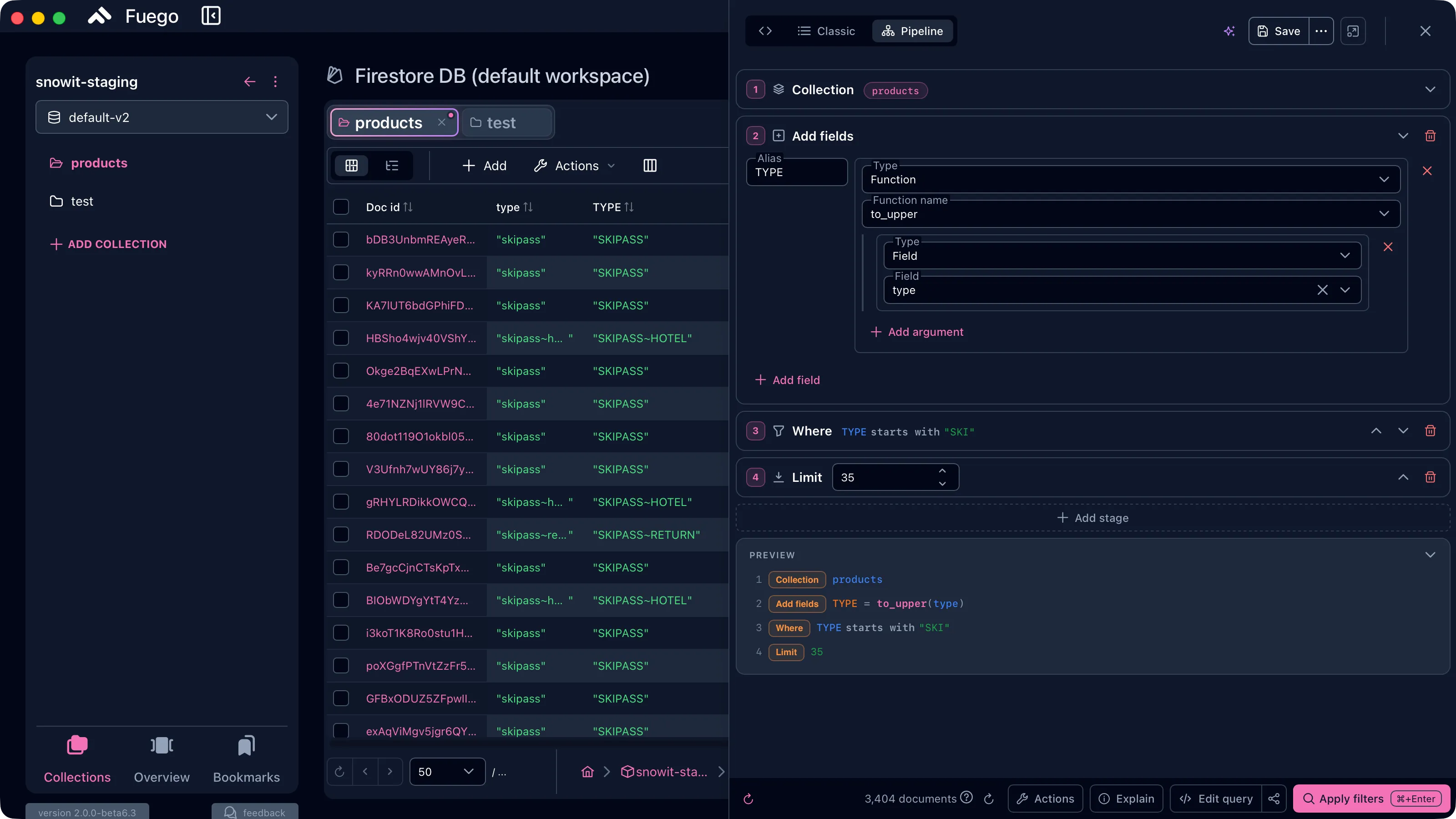
A pipeline query is an ordered sequence of stages. Each stage receives the documents produced by the previous one and hands its own output to the next. That changes what is possible: you can compute a new field, filter on the computed value, group the result, and only then sort and limit it.
Collection products → Add fields TYPE = to_upper(type) → Where TYPE starts with "SKI" → Limit 35
The example above is impossible as a classic query — type is stored in mixed
case and Firestore has no case-insensitive operator. As a pipeline it is four
stages.
Pipeline queries require a Firestore Enterprise edition database. On a Standard database the Pipeline button in the query panel stays disabled with the tooltip “Pipeline queries require the Firestore Enterprise edition”. Fuego reads the edition from the database itself; when detection fails (emulators, missing IAM permission) the mode stays disabled.
Switching to pipeline mode
The query panel has three modes, selected from the buttons in its header:
| Mode | What it is |
|---|---|
</> | The raw query as JSON, with schema validation and autocompletion |
| Classic | The standard query builder — where, order by, limit, cursors |
| Pipeline | The stage editor described on this page (Enterprise only) |
Switching from Classic to Pipeline keeps the query you already built: its filters, ordering and limit become the equivalent stages. Switching back is possible whenever the pipeline has a classic equivalent.
Anatomy of a pipeline
The input stage
Every pipeline starts with exactly one input stage. It is always first, it cannot be deleted, and the rest of the builder stays locked until it is configured.
| Input stage | Documents it produces |
|---|---|
| Collection | Every document in one collection |
| Collection group | Every document in all collections with the same ID |
| Database | Every document in the database |
| Documents | An explicit list of document paths |
| Literals | Documents you type yourself — no read from Firestore |
Changing the input type converts what can be converted (a collection path becomes a collection ID, and so on) instead of resetting the stage.
Literals deserves a mention: it lets you run a pipeline against documents
that only exist in the editor. It is the fastest way to try a chain of
functions without touching real data. The special __name__ string field sets
the document ID, e.g. "__name__": "user_1". The literals editor also has a
Generate documents with AI action that fills it with a realistic sample
set — see AI Assistant.
Processing stages
Everything after the input is a processing stage. Add stage groups them by purpose:
| Group | Stages |
|---|---|
| Common | where, sort, limit |
| Fields | select, addFields, removeFields, replaceWith |
| Grouping | aggregate, distinct |
| Pagination | offset |
| Search & vector | findNearest, search |
| Combine & transform | union, unnest, sample, let |
| Advanced | raw |
Order matters, and the builder reflects that: each stage card can be collapsed to a one-line summary, moved up or down, or removed. A stage that is incomplete is flagged, and the query cannot be applied until it is fixed.
Working with fields
Add fields
Add fields computes a new field and adds it to every document flowing through the stage. Give it an Alias — the name the computed value takes — and build the value as an expression:
- Field — the value of an existing field
- Constant — a literal value
- Function — a function applied to arguments, which are themselves expressions (so functions nest)
- Variable — a variable defined by an earlier
letstage
In the walkthrough above, the alias TYPE is the function to_upper applied to
the field type. From the next stage on, TYPE is an ordinary field: you can
filter, sort or group by it.
select keeps only the fields you list, removeFields drops the ones you
list, and replaceWith promotes a map field to the top level of the document.
Aggregate
Aggregate groups documents and computes accumulators per group. Group by zero fields to aggregate the whole result set. Available accumulators:
count, count_distinct, count_if, sum, average, minimum, maximum,
first, last, array_agg, array_agg_distinct.
Distinct is the shortcut for “one row per unique combination of these fields”.
The Where stage
The where stage has two editing modes.
Guided is the familiar shape — field, operator, value — with a much wider operator set than classic queries:
- comparison: equals, does not equal, greater/less than (or equal)
- arrays: contains, contains all, contains any
- sets: equals any, does not equal any
- strings: starts with, ends with, string contains, matches wildcard pattern, contains regular expression match, matches regular expression
- presence: field exists, is absent, evaluates to an error
- type: is type — with the full Firestore type list (string, number, int32, int64, float64, decimal128, timestamp, geo point, reference, vector, bytes, map, array, regex, object ID, min/max key, …)
Before comparing, you can chain transforms onto the field: lowercase,
uppercase, trim (left/right/both), reverse, length, type of, storage size,
vector length, parent reference. where lower(email) starts with "a" is a
guided condition, not an advanced expression.
Advanced drops the guided form and lets you write the condition as a raw expression tree, for everything the guided mode does not cover.
Conditions combine into groups with All (AND), Any (OR), None (NOR) and Exactly one (XOR), and any condition or group can be negated. Groups nest.
Search, vectors and sampling
- Search runs a full-text or geospatial query. It must be the first stage
after the input. Text mode understands spaces as AND,
"…"as an exact phrase,-wordas an exclusion andORfor alternatives; geospatial mode takes a location field, a center and a max distance in meters. You can add the relevance score to the results as a field and sort by it. - Find nearest is vector search — see
Vector Search — with
euclidean,cosineordot_productas the distance measure. - Sample returns a random subset, either a number of documents or a percentage. Useful to eyeball a large collection cheaply.
- Union appends the result of a second pipeline, unnest expands an array field into one document per element, and let defines variables reused by later stages.
Preview, JSON and raw stages
The Preview panel at the bottom of the builder shows the pipeline as a numbered, readable list of stages, updated as you edit — a quick way to verify that stage order is what you meant.
Every stage has an Edit as JSON action for the cases the visual editor does not cover, and you can go back to Edit visually afterwards. The Raw stage takes an arbitrary stage definition, so a stage Fuego does not know yet is never a blocker.
The </> mode of the query panel shows the whole query as JSON, validated
against Fuego’s query schema with inline errors and autocompletion.
Running a pipeline
Apply the pipeline with the Apply filters button (⌘ ⏎ / Ctrl ⏎). The footer shows the live document count for the current query, and the results appear in the table like any other query.
Explain works on pipelines too. It reports the execution tree, the indexes the planner used, and warns when the plan scans the source without an index:
The plan scans the source without an index (table scan). Creating an index for this query would improve performance and cost.
From there, the Index Advisor can derive the index that query needs.
Firestore may execute the query in analyze mode when the backend does not support a plan-only explain. In that case the reads are billed.
Limitations to keep in mind
- No realtime. Pipeline queries run once. If realtime is on when you switch to pipeline mode, Fuego offers to convert the pipeline back to a classic query when an equivalent exists, and tells you when it does not.
- Sorting from the table header may require pipeline mode. When it does, Fuego asks before switching, because realtime will be turned off.
- System fields are snake_case:
__create_time__and__update_time__. The camelCase spellings are rejected by the server as reserved keys, both as field references and as output aliases. Saved queries created before this change are migrated automatically. __read_time__cannot be selected or sorted on.
Saving and sharing
Pipeline queries are saved, bookmarked and shared exactly like classic ones — see Bookmarks & Favorite Queries. A saved pipeline keeps its stages, so a colleague opening the shared query gets the same chain.
Related
- Querying data — the classic query builder
- Index management
- Index Advisor
- Vector search
- AI Assistant — ask it to write a pipeline for you