
Query & Search
Since v2.0.0Index Advisor
The Index Advisor applies Firestore's indexing rules to one query and tells you which composite index it needs, or compares every index in a database to surface exact duplicates and structural overlaps. Optionally verified against the live database with Query Explain.
What it does
The Index Advisor answers two questions that are otherwise guesswork:
- “Which index does this query need?” — it resolves the query’s target collection, loads that collection’s composite indexes and automatic-index settings, and applies Firestore’s indexing rules to the query as written.
- “Do I have indexes I don’t need?” — it loads every composite index in the database and compares their definitions structurally.
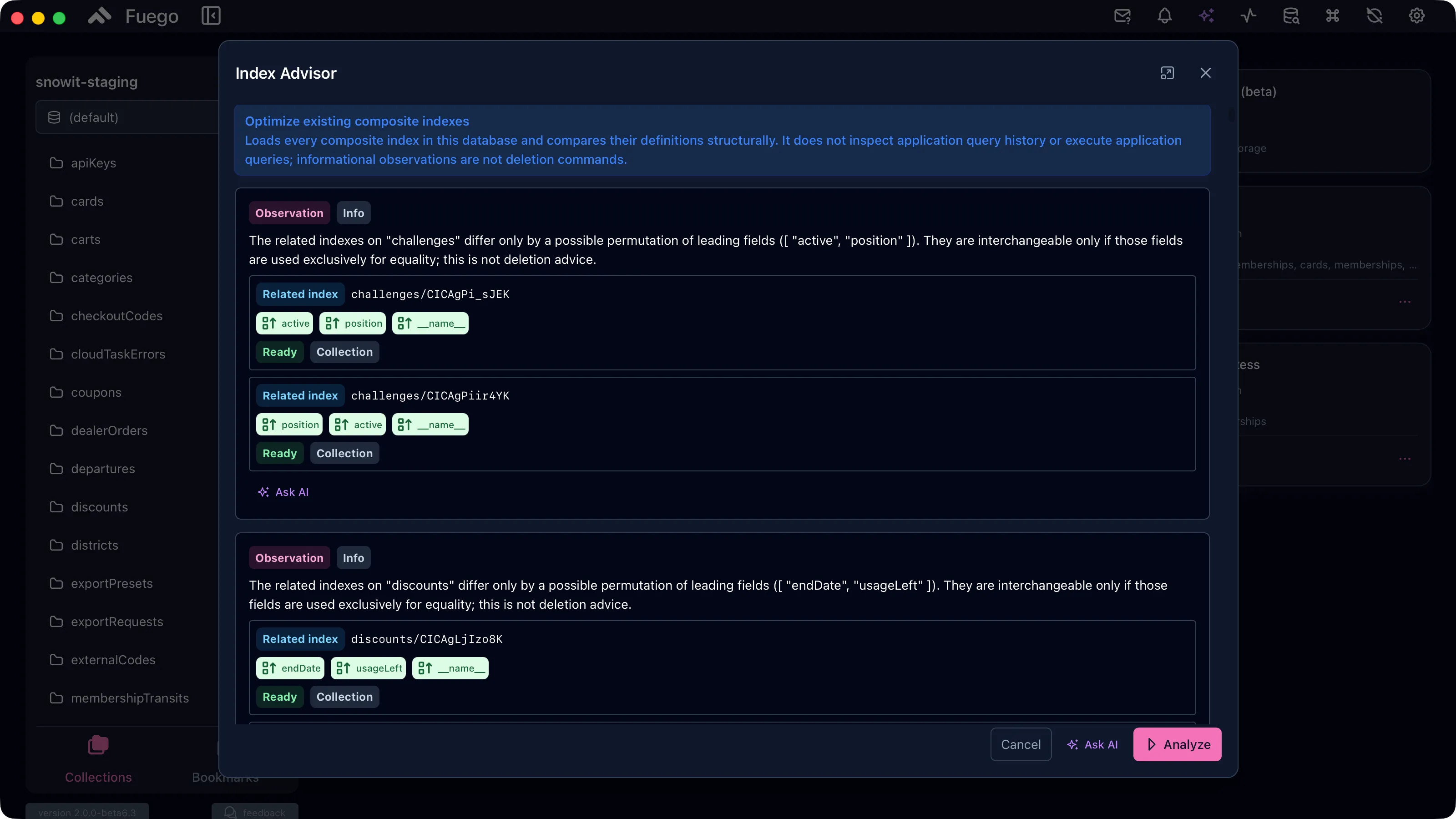
The advisor is deterministic. It reasons about index definitions and the query you gave it — it does not read your application’s query history and it does not execute your application’s queries. Nothing it reports is executed on your behalf, and nothing is deleted without your confirmation.
Opening it
| Where | Mode it opens in |
|---|---|
| Query panel → overflow menu → Index Advisor | Analyze the current query |
| List indexes dialog → Index Advisor | Optimize existing indexes |
| Project menu → Index Advisor | Optimize existing indexes |
| Command palette → Index Advisor | Optimize existing indexes |
Both modes are described in the dialog itself, and the query the advisor is about to analyze is shown — and editable — in the Submitted query panel, so you can tweak it and re-run without leaving the dialog.
Analyzing a query
The advisor first shows the resolved target: the collection or collection
group the query runs against. A classic query needs a collection path; a
pipeline needs collection or collectionGroup as its first stage. Without a
resolvable target there is nothing to analyze.
Press Analyze. Progress is reported step by step — resolving the request, loading the target’s composite indexes, loading automatic-index settings, applying the rules.
The rules differ by edition: Standard databases follow classic composite-index and automatic-single-field-index behavior, Enterprise databases follow the Enterprise index model.
Verify with Firestore Query Explain
An optional second pass checks the analysis against the live database. After the deterministic rules have run, the advisor asks Firestore to explain the submitted query and then confirms, replaces or removes its create advice accordingly. Results carry a Confirmed, Rejected or Check failed badge.
Verification contacts Firestore. The advisor requests a plan-only explain first, but compatibility fallbacks may execute the query and incur document reads. It is off by default.
If the explain cannot complete, the deterministic analysis remains available and unchanged.
Reading the results
Each result is a card carrying two tags.
Kind — what it is about:
| Kind | Meaning |
|---|---|
| Create | An index that does not exist yet and the query needs |
| Delete | An exact duplicate of another index |
| Exemption | A single-field index setting to review |
| Observation | Something worth knowing — never an instruction |
Tier — how confident the advice is:
| Tier | Meaning |
|---|---|
| Safe | Applying it has no downside worth discussing |
| Tradeoff | It helps, but costs something — fewer indexes for more scanned entries |
| Info | An observation that depends on how your queries actually use the fields |
The card explains itself in words — for example “The submitted query on
orders needs an index that does not exist yet”, or “The related indexes on
challenges differ only by a possible permutation of leading fields
(active, position). They are interchangeable only if those fields are used
exclusively for equality; this is not deletion advice.” — and then shows the
fields of the proposed index, plus every related existing index with its state,
scope, density, and multikey or unique flags.
Acting on a result
Actions sit at two levels, because a single finding can involve several indexes.
On the result itself:
- Create index… opens the index creation dialog pre-filled with the proposed definition, so you can review it before it is created.
- Delete index is offered only for exact duplicates, and always behind a confirmation — the operation cannot be undone.
- Open field exemption… appears on exemption findings and opens the single-field exemption dialog already pointing at the collection and field the advisor named.
- Open single-field settings appears when automatic-index coverage could not be read, and takes you to the settings the advisor failed to inspect.
- Mark reviewed (optimize mode only) collapses a finding you have already judged. Optimize mode re-derives the same structural observations on every run, so this keeps the next run’s list to what is actually new. Reviewed findings come back with the Show reviewed toggle, and the state is kept per project database on this machine.
- Ask AI hands the analysis to the AI assistant, which can reason about your query patterns in a way deterministic rules cannot.
On each index the finding references:
- Show in index list opens index management narrowed to that index.
- Edit index… opens the index builder on the existing definition, so you can restructure it instead of dropping it.
- Copy definition copies it as index JSON, a
firestore.indexes.jsonentry, agcloudcommand, or the raw resource name. - Delete anyway… appears only on the indexes a finding actually implicates — never on an index the finding relies on. On a possible index merge, for example, it is offered on the wide index and not on the narrow ones that would serve the query in its place. The confirmation repeats the assumption the advisor could not verify.
When there is nothing to report, the advisor says so explicitly: “No additional composite index advice was found for the submitted query”.
Exporting and printing the report
Export report… in the dialog footer appears once an analysis has produced a result. Its default action writes a self-contained HTML report and opens it in your browser; the dropdown offers the rest:
| Output | What it is |
|---|---|
| HTML | A standalone, printable document — no external assets, no scripts |
| Print / save as PDF | The same HTML, opened straight in your browser so you can print or save a PDF |
| Markdown | Plain text for a ticket, a PR, or a repository |
| firestore.indexes.json | A deployable file containing the indexes to create |
| gcloud script | A shell script: creations runnable, deletions commented out |
| Copy to clipboard | Any of the four, without writing a file |
Every report carries the full context — project, database, edition, mode, timestamp, Fuego version, and in query mode the analyzed query — followed by the findings grouped by kind with the complete definition of each referenced index, and a limitations section. Findings marked reviewed are included: the export is an archive of the analysis, not a snapshot of what the dialog is showing.
Two deliberate limits on the applicable formats:
firestore.indexes.jsonlists only indexes to create. Deletions cannot be expressed there, becausefirebase deployremoves indexes by omission — a file implying otherwise would be dangerous.- Every deletion in the gcloud script is commented out, each preceded by the finding that suggested it. Uncomment the ones you have decided on.
Optimizing existing indexes
The optimize mode never derives advice from a query. It compares definitions and reports:
- Exact duplicates — two identical indexes on the same collection. This is the only case where deletion is advised outright.
- Possible equality permutations — indexes that differ only by the order of their leading fields. Interchangeable only if those fields are used purely for equality.
- Possible index merging — a wide index that Firestore may be able to serve through several narrower ones, or an all-ascending composite that automatic index merging may cover.
- Dense prefix overlap (Enterprise) — two dense indexes that overlap by prefix, where the shorter one may still be intentional for ordering.
Everything except exact duplicates is an observation. The advisor cannot see which of your queries rely on an index, so it stops at telling you what it noticed and why it might matter — but it does say which of the indexes involved could be the one to drop if its assumption holds, and only those offer Delete anyway….
Limitations worth knowing
- The advisor does not estimate range selectivity. When a proposed index has more than one range field, the order follows the query as written and the card says so — review it before creating the index.
- If automatic-index settings for a collection cannot be read, the advisor says coverage is unknown rather than proposing a composite index from an assumption.
- A query that cannot be fully interpreted still produces advice, flagged with the part that could not be interpreted.
Related
- Index management
- Querying data
- Query pipelines — the Explain panel flags table scans
- AI Assistant