Data ops

Rename a Firestore collection or document

Firestore has no rename operation. Fuego does the copy-and-delete for you, subcollections included, as one background task with visible progress.

Short answer

How do you rename a Firestore collection?

You can't rename it in place: Firestore has no rename or move operation, and its API can create, read, update and delete documents but not change their path. A new name always means copying every document to the new path and deleting the originals.

Fuego runs both steps for you as one task, from Tools ▸ Rename collection, Tools ▸ Move collection or Rename document.

At a glance

  • Firestore: no rename or move, and a collection exists only while it holds documents
  • Fuego: renames and moves collections, across databases and projects too, and renames documents
  • Kept: document IDs, field values and subcollections
  • Up to you: references to the old path in your data, code, rules and indexes
What Fuego does

Rename and move tools for Firestore

Rename a collection

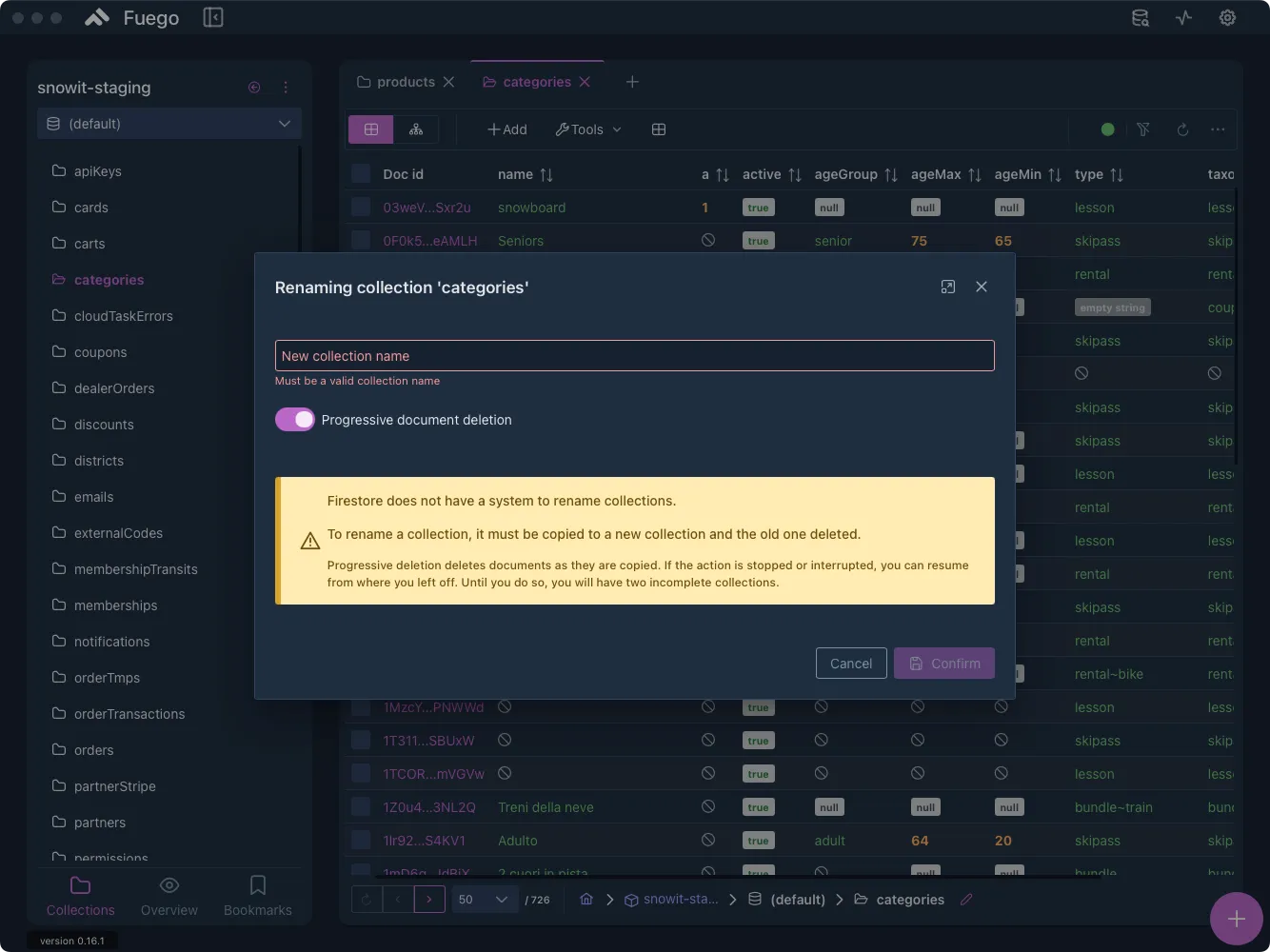
Tools ▸ Rename collection copies every document into the new collection, then deletes the old one. Document IDs stay the same.

Move a collection

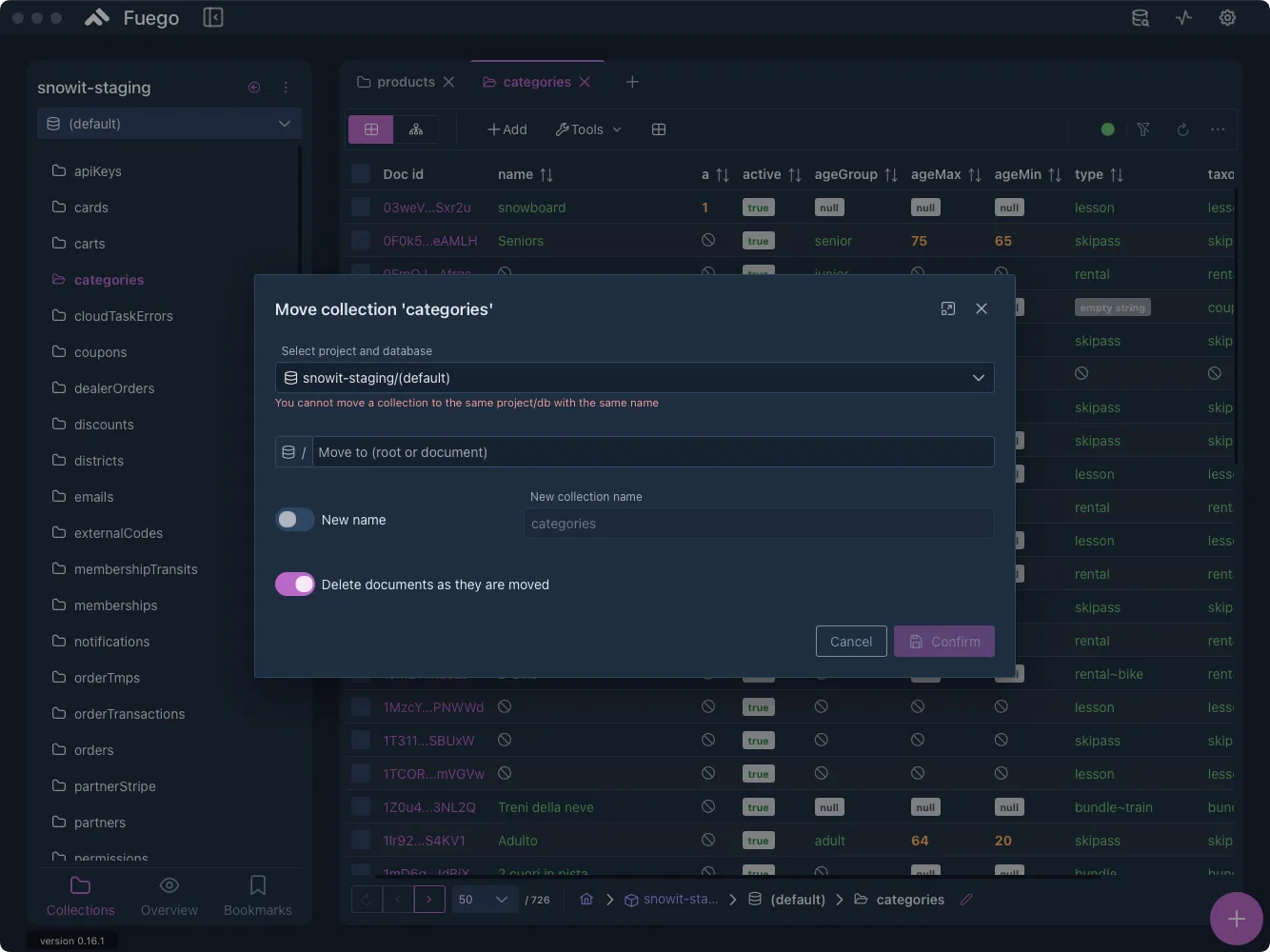
Send a collection to the root or under an existing document, in another database or Firebase project if needed, with an optional new name.

Rename a document

Give one document a new ID. Its data and all its subcollections are copied, then the original is deleted.

Subcollections included

Subcollections are copied with their parent documents and removed from the old path along with them.

Two deletion modes

Progressive deletion removes each document right after it is copied, so an interrupted task can be resumed. With it off, the old collection is deleted only after the full copy.

Typed confirmation

Collection renames and moves start only after you type a keyword, such as RENAME plus the collection name, then run in the background with visible progress.

Workflow

How to rename a Firestore collection with Fuego

  1. Open the Actions menu

    Open the collection you want to rename and click Actions in its toolbar (or right-click the collection in the sidebar and open Tools).

  2. Choose Rename collection

    Select Rename collection to open the rename dialog.

  3. Enter the new name

    Type a valid collection name that differs from the current one.

  4. Pick a deletion mode

    Turn Progressive document deletion on to remove each document once copied, or off to delete the old collection after the full copy.

  5. Confirm

    Click Confirm and type the keyword shown, such as RENAME plus the collection name.

Fuego's Rename collection dialog with the new collection name field, the Progressive document deletion switch and a note that Firestore cannot rename collections
Tools ▸ Rename collection: the new name and the deletion mode.
Fuego's Move collection dialog with the project and database picker, the destination path, the New name switch and the Delete documents as they are moved option
Tools ▸ Move collection: target project, database and path.

More ways to restructure

Move a collection or rename a document

Move a collection

  1. Open the collection and choose Actions ▸ Move collection (or Tools ▸ Move collection from the sidebar context menu).
  2. Select the target project and database.
  3. Choose the new path: the root or an existing document.
  4. Optionally turn on New name.
  5. Choose whether to delete documents as they are moved.
  6. Click Confirm and type the keyword shown.

Move collection guide →

Rename a document

  1. Select the document.
  2. Open its context menu, or right-click its ID.
  3. Choose Rename document.
  4. Enter a new, different document ID.
  5. Confirm.

Rename guide →

Rename a field instead

A field name is not part of the document path, so the document stays where it is. Use Tools ▸ Update documents with a Rename attribute action.

Bulk update guide →

Firestore facts

Why a rename is really a copy and a delete

The path is the identity

A document is identified by its location, such as users/alovelace (data model). A new name or ID means a new document, with a new creation time.

Subcollections stay behind

Deleting a document does not delete the documents in its subcollections (delete data). A script that copies and deletes only top-level documents leaves orphaned subcollections at the old path.

Every operation is billed

Each copied document costs a read and a write, each removal a delete (pricing). The free quota is 50,000 reads, 20,000 writes and 20,000 deletes per day, for one free database per project.

Google's own recipe

For migrations, Google recommends copying each document to the new collection, then deleting the old one, and ramping up from at most 500 operations per second by 50% every 5 minutes (best practices).

Use cases

When to rename or move Firestore data

Fix a naming convention

Change UserProfiles to userProfiles before more code depends on it.

Nest a collection

Move orders under a parent document such as accounts/acme when your data model grows a level.

Change database or project

Move a collection from (default) to a named database or another Firebase project.

Fix a document ID

Re-key a document created with an auto-generated ID, for example to use the user's UID.

Things to know

Limits and checks before you rename

Limits

  • Not atomic: an interrupted rename leaves two incomplete collections until the task is resumed or run again.
  • Reference fields and stored paths keep pointing to the old location.
  • Large collections take time, because each document is processed individually.
  • A document already at the target path with the same ID is overwritten, so choose an unused name.

FAQ

Frequently asked questions

Can you rename a collection in Firestore?

Not directly. Firestore has no rename or move operation for collections or documents, so you copy every document to the new name and delete the originals. Fuego runs both steps from Tools ▸ Rename collection.

Does Fuego keep document IDs and subcollections when it renames a collection?

Yes. Each document keeps its ID and field values in the new collection, and its subcollections are copied too. The originals, subcollections included, are then deleted. Firestore gives the copies a new creation time.

What happens if a rename is interrupted?

Documents end up split between the two collections, because Firestore cannot rename atomically. With progressive deletion on, you can resume the task where it stopped. With it off, the old collection is deleted only after every document has been copied.

Are references to the renamed collection or document updated?

No. Reference fields pointing to the old path, and the old name in your app code, security rules and indexes, stay as they are. Update them yourself.

How much does it cost to rename a Firestore collection?

Firestore bills each operation: at least a read and a write for every document copied and a delete for every document removed, subcollections included. With progressive deletion off, reads double. The free quota is 50,000 reads, 20,000 writes and 20,000 deletes per day.

Can I move a Firestore collection to another database or project?

Yes. Tools ▸ Move collection lets you pick the target project and database, place the collection at the root or under an existing document, and optionally rename it.

Which Fuego plans include rename and move?

Rename and move are batch operations, included in the Individual, Team and Lifetime plans but not in the Free plan. The Individual plan costs 9.99 EUR per month and starts with a 14-day free trial.

Get started

Rename Firestore data without a script

Download Fuego for macOS, Windows or Linux. Rename and move are part of the Individual plan, which starts with a 14-day free trial.