
Fuego 2.0: AI assistant, multi-window, and an MCP server
Fuego 2.0 ships a built-in AI assistant that reads your real data, an MCP server with 40 tools for Claude and other agents, native multi-window support, on-device anonymization, Firestore Enterprise pipelines, JSON Schema generation and validation, and a rebuilt native application layer.
Fuego 2.0 is here, and it’s the largest release since the project started.
Version 1.0 was about maturity. Version 2.0 is about reach: Fuego now runs on a rebuilt native application layer, opens as many windows as you need, talks to AI agents through an MCP server, and ships its own assistant that can read your Firestore data and hand you back schemas, queries, and dashboard widgets you can apply with one click.
It’s also considerably faster. The video below runs the same operations twice — Fuego 1 in the first half, Fuego 2 in the second — with nothing sped up or cut:
Here’s everything that’s new.
Why 2.0
The version number reflects a foundation change, not just a feature list.
Fuego’s native layer has been rewritten. That work isn’t visible in a
screenshot, but it’s what makes the rest of this release possible: real
multi-window support with per-window state, proper OS integration (Stage Manager
on macOS, native window management everywhere), a fuego:// URL scheme, .fuego
file associations, and noticeably better memory behavior when you keep many
collections open.
On top of that foundation, 2.0 adds the features below.
The AI assistant
The headline feature. Fuego now has a built-in conversational assistant that knows where you are and what you’re looking at.
Open it from the ✨ button in the topbar, from the command palette (“Ask AI assistant”), or from the contextual Ask AI buttons in the JSON Schema editor, the Index Advisor, the query builder sidebar, and the literals editor. It opens as a floating window you can drag, resize, maximize, or collapse to a pill — and it remembers where you left it.
It knows your context
Every message carries a snapshot of your current position — project, database, collection — plus whatever the open panels contribute: the schema you’re editing, the query you’re building, the documents in the literals editor, the indexes the advisor is looking at. Those contributions show up as chips above the input, so you can see exactly what the assistant can see.
That means “improve this schema” or “how many documents match this query” just work, with no copy-pasting and no re-explaining.
It answers with things you can use
The assistant doesn’t dump JSON into a chat bubble. It delivers typed cards with real actions:
- Schema proposals — copy, diff against the current schema, or Apply directly into the schema editor
- Query proposals — run in the explorer via deep link, or load straight into the visual query builder
- Result tables — the backend actually runs the query and shows you the rows in a compact table you can copy or open in the explorer
- Sample documents — generated seed data you can push into the literals editor
- Dashboard widgets — a ready-made widget you can add to any dashboard from a picker
And when the assistant is missing something, it asks instead of guessing: you get a real question with one-click answer options.
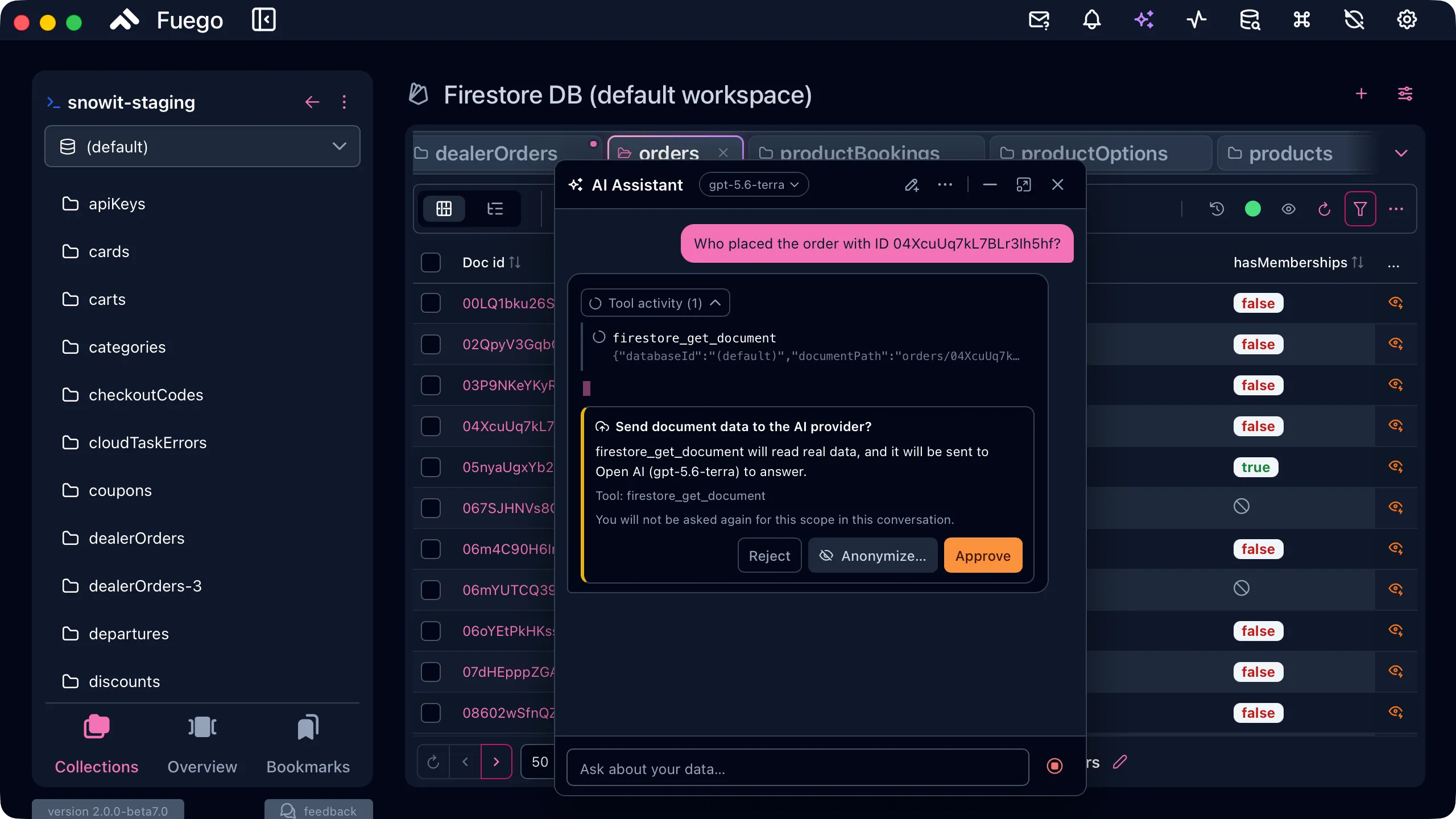
It doesn’t touch your data unless you let it
The assistant starts read-only. Writing is an explicit opt-in in Settings → AI, and even then it stays boxed in:
- it never writes to a project flagged as production, whatever the other settings say
- it stays inside the projects and databases you allowed under Settings → AI → Data access
- every single write or delete is confirmed in the chat, one call at a time, and that confirmation cannot be turned off
With writes off — the default — any write attempt is refused at the access-guard level, and the assistant answers with a proposal card for you to apply yourself.
Conversations are stored locally and encrypted at rest, because tool results contain real customer data.
Bring your own model
Configure providers in Settings → AI. The assistant works with:
- Google — Gemini and Vertex AI
- OpenAI and any OpenAI-compatible endpoint
- Ollama — fully local, no data leaves your machine
- Anthropic, OpenRouter, Mistral, xAI, DeepSeek
Provider and model are remembered per conversation, and you can switch models from the badge in the assistant’s title bar.
An MCP server with 40 tools
If you’d rather use your own agent, Fuego 2.0 exposes its capabilities over the Model Context Protocol (spec revision 2026-07-28, with older revisions still supported). Enable the server from the AI tab and point Claude, Cursor, or any MCP client at it.
The server ships 40 tools — 23 read, 17 write — covering Firestore documents and queries, index management, Firebase Authentication users, Firebase Storage, bookmarks, background jobs and exports. Access is yours to control: pick which tools are exposed with an allowlist, restrict which projects and databases are reachable, and decide whether write tools are available at all. You can also ask the server to anonymize every document it returns, so an agent can work on the shape of your data without ever seeing the values.
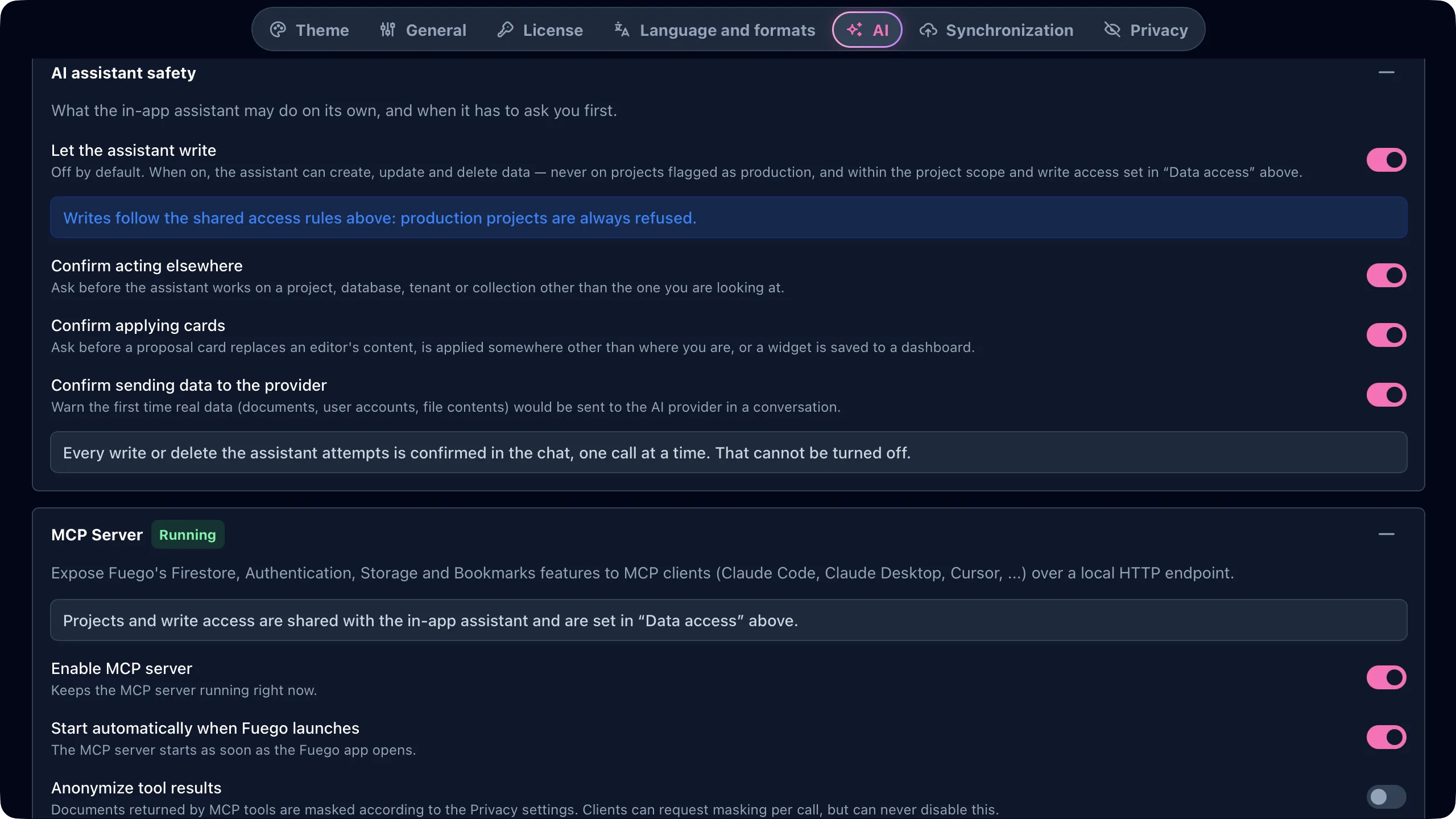
The same tool registry powers both the MCP server and the built-in assistant, so the two never drift apart.
Native multi-window
Right-click any resource and open it in a new window — a collection, a dashboard, a query, a Storage bucket. Middle-click (or ⌘/Ctrl-click) a project name to open the whole project in its own window.
Windows aren’t independent copies of the app. Edit a document in one and every other window showing it updates in place — and it works even with real-time turned off, because the change travels inside Fuego instead of going out to Firestore and back. The same goes for collections, schemas, saved queries, workspaces, bookmarks and background tasks. What stays local to each window is what you’re looking at: tabs, scroll position, and its own assistant conversation.
Each window manages its own datasets, so closing one actually frees its memory instead of leaving it around.
Command palette and notification center
Press ⌘ ⇧ P (macOS) or Ctrl ⇧ P (Windows/Linux) to open the command palette and run any action without hunting through menus. If that combination clashes with something else in your setup, pick another one in Settings → Command palette shortcut (⌘ P, ⌘ ⇧ K and ⌘ J are available). The assistant has its own shortcut, ⌘ J.
A new notification center collects the things you’d otherwise miss — completed tasks, sync results, warnings — in one place.
The sidebar also learned a trick: when it’s closed, hovering the left edge slides it back in, so the main actions are always one gesture away.
Dashboards: charts, top lists, notes, users, and Storage
Dashboards get five new widget types:
- Charts — visualize your data instead of reading numbers off a table
- Top lists — the highest or lowest N documents by any field
- Notes — annotate a dashboard so the next person understands it
- Auth users — a live count of your Firebase Authentication users
- Storage — preview a single file, or list files coming from a query
There’s also a Bookmarks widget, so the collections, documents, queries and files you care about can sit right on the dashboard.
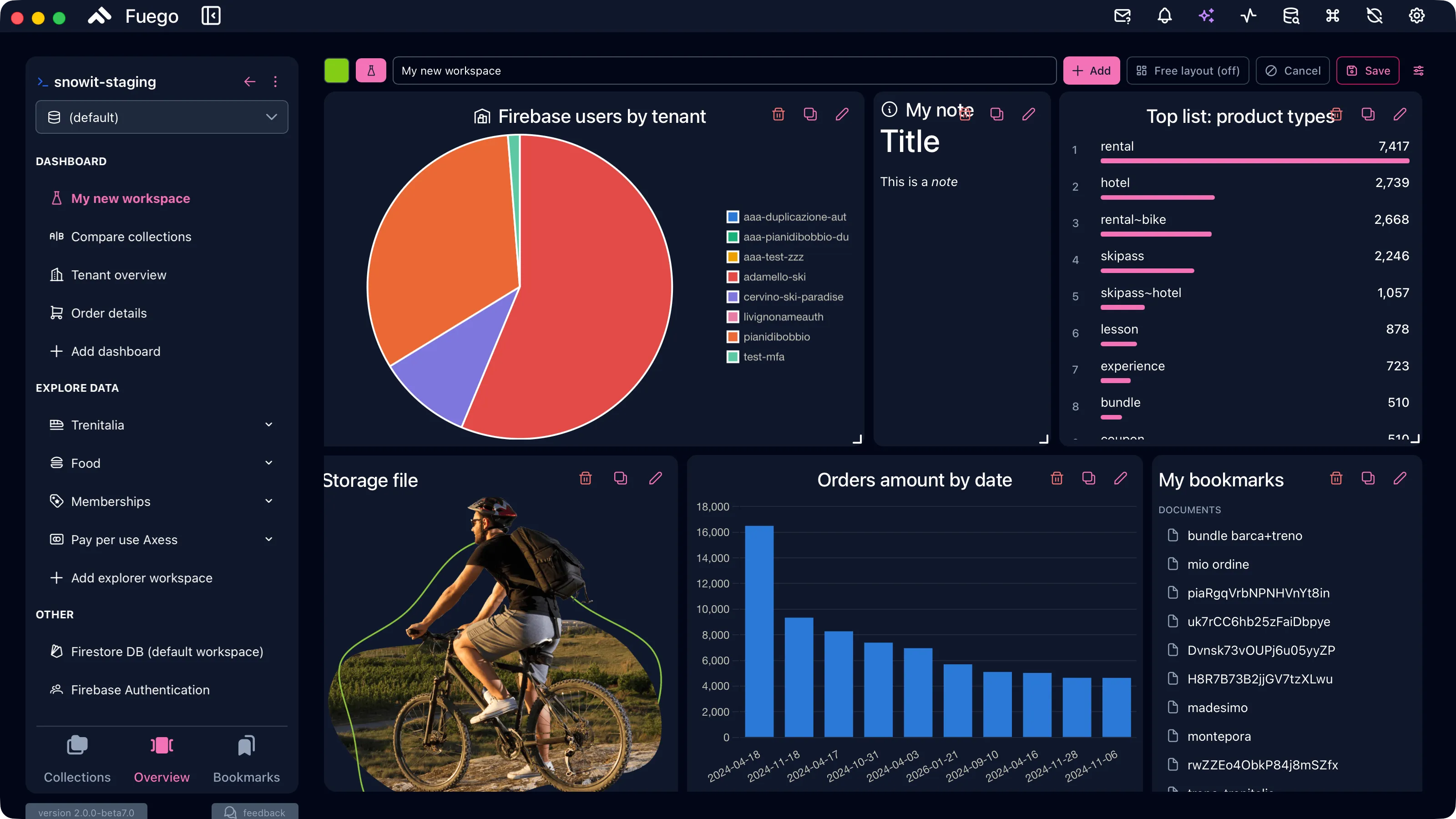
Combined with the assistant’s dashboard_widget artifacts, you can describe the
panel you want and add it to a dashboard without touching the widget editor.
JSON Schema generation and document validation
Fuego can now infer a JSON Schema from the documents in a collection — optionally with AI assistance to clean up types, descriptions, and optionality.
Once you have a schema, you can validate documents against it and see which
ones don’t match. This is the fastest way to find the drift that accumulates in
any real Firestore collection: the field that used to be a string, the document
that’s missing createdAt, the enum value nobody expected.
Anonymization: share data without sharing data
Real Firestore documents are full of things you’d rather not paste into a ticket, hand to a colleague, or send to a model provider. Fuego 2.0 can anonymize documents on the fly, on your machine.
Configure the policy once in Settings → Privacy, then use it wherever data leaves its original context: an Anonymize documents toggle in the explorer toolbar, exports and imports, the payload the AI assistant is about to send to its provider (with a preview and a Send anonymized button), and the results the MCP server returns.
You choose how values are masked:
- Shape-preserving mask (the default) —
m***@g***.com,**** **** **** 1234 - Generic placeholders —
[EMAIL],[PHONE] - Realistic fake data — deterministic fictional values from reserved ranges, so joins between documents still line up
- Deterministic hash — unreadable but correlatable
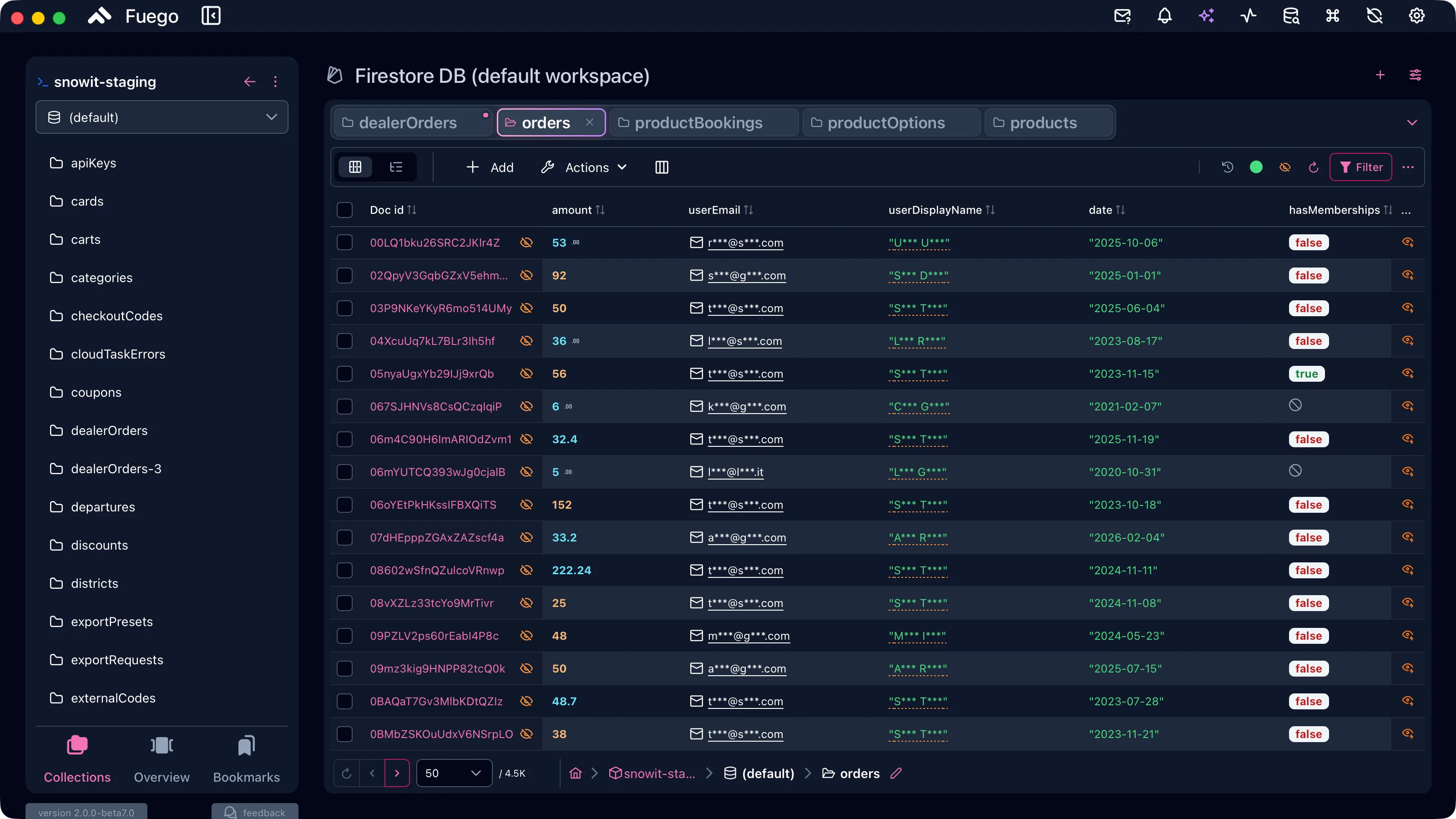
Masking is field by field, not document by document: what the detectors recognise gets replaced, everything else stays exactly as it is, so the collection is still readable and still yours to work on.
Built-in detectors cover emails, phone numbers, IP addresses, credit card numbers (Luhn-checked) and conventional PII field names, and you can add your own field names or exclude entire collections. For everything a regex can’t catch — people, companies, places written in free text — there’s an optional on-device NER model running on the ONNX runtime: it’s downloaded on demand and never sends anything off your machine.
When the assistant is about to send something out, you see exactly what leaves — field by field, before and after:
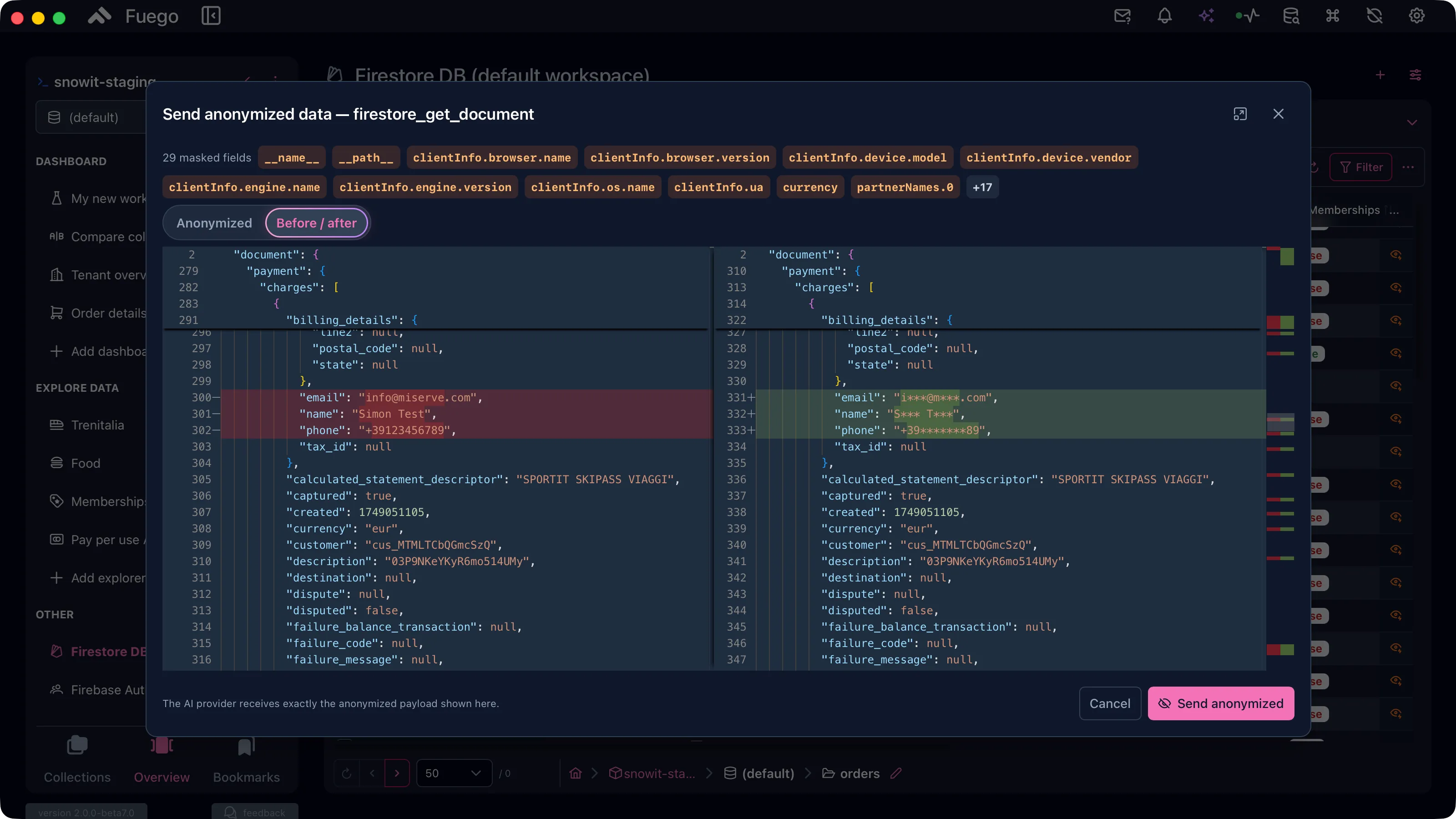
Anonymized documents are read-only display copies. Masked values are never written back to Firestore.
Read the anonymization guide →
Bookmarks and Quick View
Bookmarks now cover everything: collections, documents, saved queries and Storage files. They show up on the project home in a dedicated bar, and in a dashboard widget.
Quick View is the other half of the same idea. Right-click a document or a Storage file and open it in a lightweight preview window — you see what you need without changing view, losing your query, or opening a tab you’ll have to close.
Firestore Enterprise: pipelines and index management
Fuego 2.0 adds support for Firestore Enterprise edition:
- Pipeline queries — build and run pipeline queries against capable databases, with stages instead of a flat filter list
- Index management for Enterprise — the same index tooling you already use, extended to Enterprise databases
Code generation understands pipelines too. The query builder could already turn a query into code; now it does the same for pipeline queries, emitting code for every SDK that supports them — Admin: Node.js, Python, Go, Java; Client: Web/TypeScript, Kotlin, Swift.
The assistant is aware of this too: on a database that supports pipelines, it prefers pipeline queries when they’re the better fit, and it ships a bundled skill for writing them.
Index management improvements
- More filters in the index list, so large index sets stay navigable
- Index exemptions can now be created from the app
- Search indexes (Preview) can be created and managed from the app
- TTL policies on a field can be enabled and disabled without leaving Fuego, with their state visible in the field list
- Vector index creation is clearer and less error-prone
- Enterprise edition indexes are supported
Index Advisor
New in 2.0: paste or build a query, and the Index Advisor analyses it and tells you exactly which index it needs — deterministically, without asking a model. If you want a second opinion, there’s an Ask AI shortcut right next to it.
Live document count in the Query Builder
As you build a query, the Query Builder now shows a live count of the documents that match. You find out that your filter is wrong while you’re writing it, instead of after you run it.
Firebase Storage: drag & drop and more
File Management picks up the interactions you’d expect from a real file manager:
- Drag & drop to move files and folders — hold Option (macOS) or Alt (Windows) to copy instead
- Drag selection to select multiple items at once
- A compact icon view for dense buckets
The .fuego format and fuego:// links
Export and import get a single, coherent format. File → Export and
File → Import now use .fuego files with a manifest and integrity
verification, covering app backups, workspaces and dashboards, and shared
queries. Legacy formats still import: .zip backups, .json workspaces and
queries all keep working.
Alongside it, Fuego registers a fuego:// URL scheme and a .fuego file
association. That means a link can point directly at a document, a collection, a
query, a Storage file or bucket, or a user — and open it in the app. Grab one
with Copy Fuego link from a document’s context menu, from the query share
menu, or from the command palette, and paste it into a ticket, a PR, or a Slack
thread.
Double-clicking a .fuego file opens it in Fuego too. URL scheme and file
association are available on macOS and Windows; on Linux you can still import
.fuego files from File → Import.
Background tasks you can pause
Long imports and exports can now be paused and resumed, and the activity sidebar shows considerably more detail about what each task is doing and how far along it is.
They also survive a crash: a task interrupted by a forced quit is restored on the next launch and picks up where it stopped, instead of starting over.
Read time (PITR), redesigned and fixed
The read time picker has been rebuilt around an inline calendar with date and time, replacing the old timeline of buttons. A header shows the selected instant and how long ago it was, and the window of versions actually available to you is now stated explicitly instead of implied.
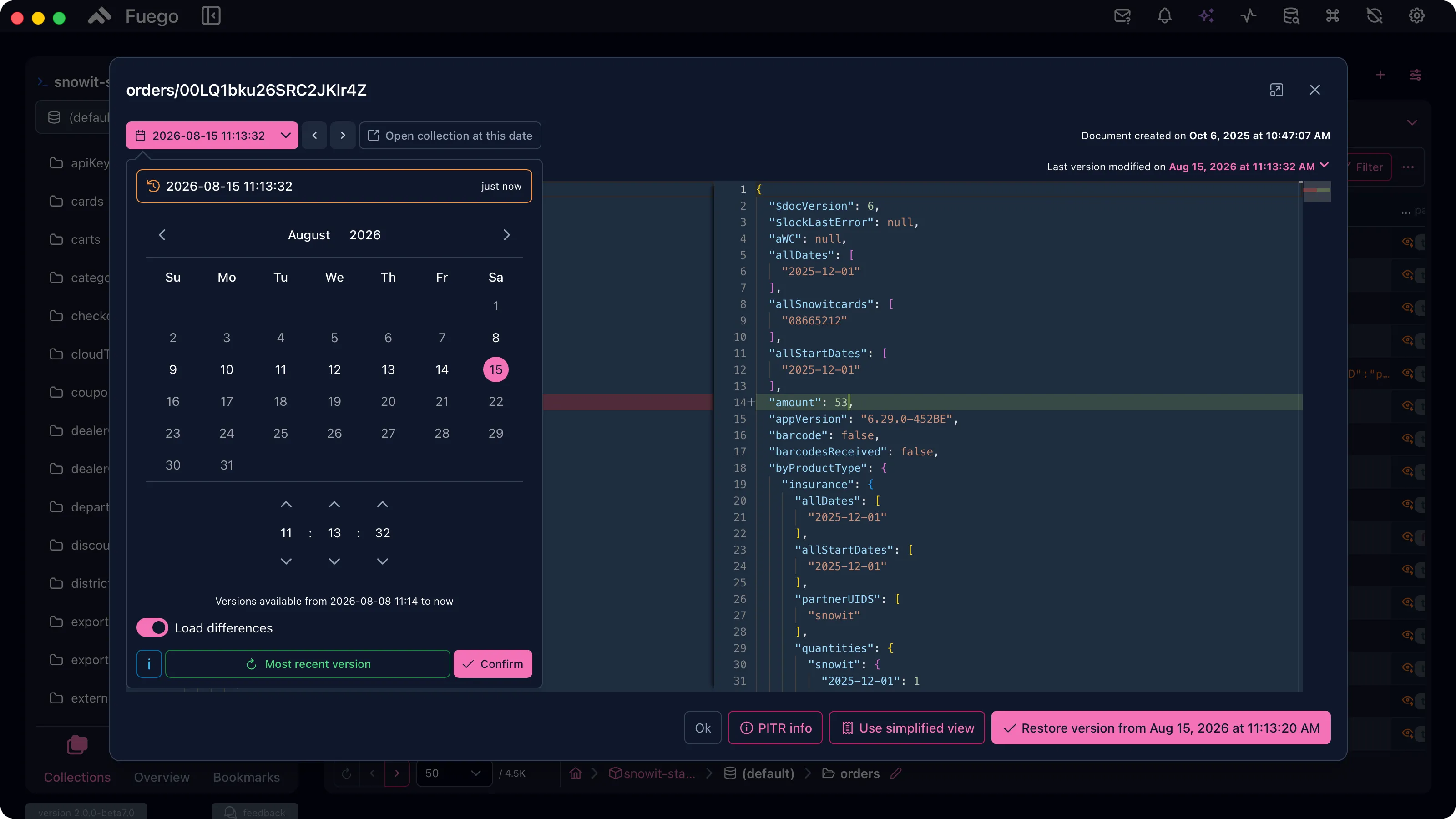
This release also fixes a long-standing annoyance: PITR could show up as “not activatable” when reading database info failed silently. The Firebase CLI can return output that parses as a success with empty data, and that empty result was being cached for an hour — leaving PITR stuck at “disabled”. Database info is now read primarily through the Firestore Admin SDK in a single, more reliable call, fallbacks are validated, and incomplete results are never cached. The picker also distinguishes unknown from disabled, and has a Re-check button that bypasses the cache — handy right after you enable PITR from the console.
int64 and double, handled properly
Firestore distinguishes 64-bit integers from doubles, and Fuego 2.0 now does the same. Whole numbers that fit in an int64 are stored as int64, everything else as a double — matching what the Firestore SDKs do.
When you need to force the type, both the inline editor and the Monaco editor understand an explicit form:
{ "price": { "__double__": 10 }, "quantity": { "__int64__": 3 } }
Explorer: realtime in tree view, and better copying
- Realtime updates now reach nested resources in tree view, so an expanded subcollection stays live instead of going stale until you reload
- Reference previews load the referenced document, right there in the table
- Copy attribute values from the selected documents, optionally unique values only — documents sharing a value are copied once
- Find on the page (⌘ F / Ctrl F) searches the text on the current screen
- Global search results can be opened in a new window
Firebase Authentication
- Multiple tabs, exactly like the Firestore explorer — one per filter, or one per tenant
- A user count in the list header
- Last sign-in date as a column
A redesigned home, and “workspaces”
The project home has been rebuilt: stacked, adaptive project cards, a bookmarks bar, persistent extra views, and grids that use the space they’re given instead of a fixed layout.
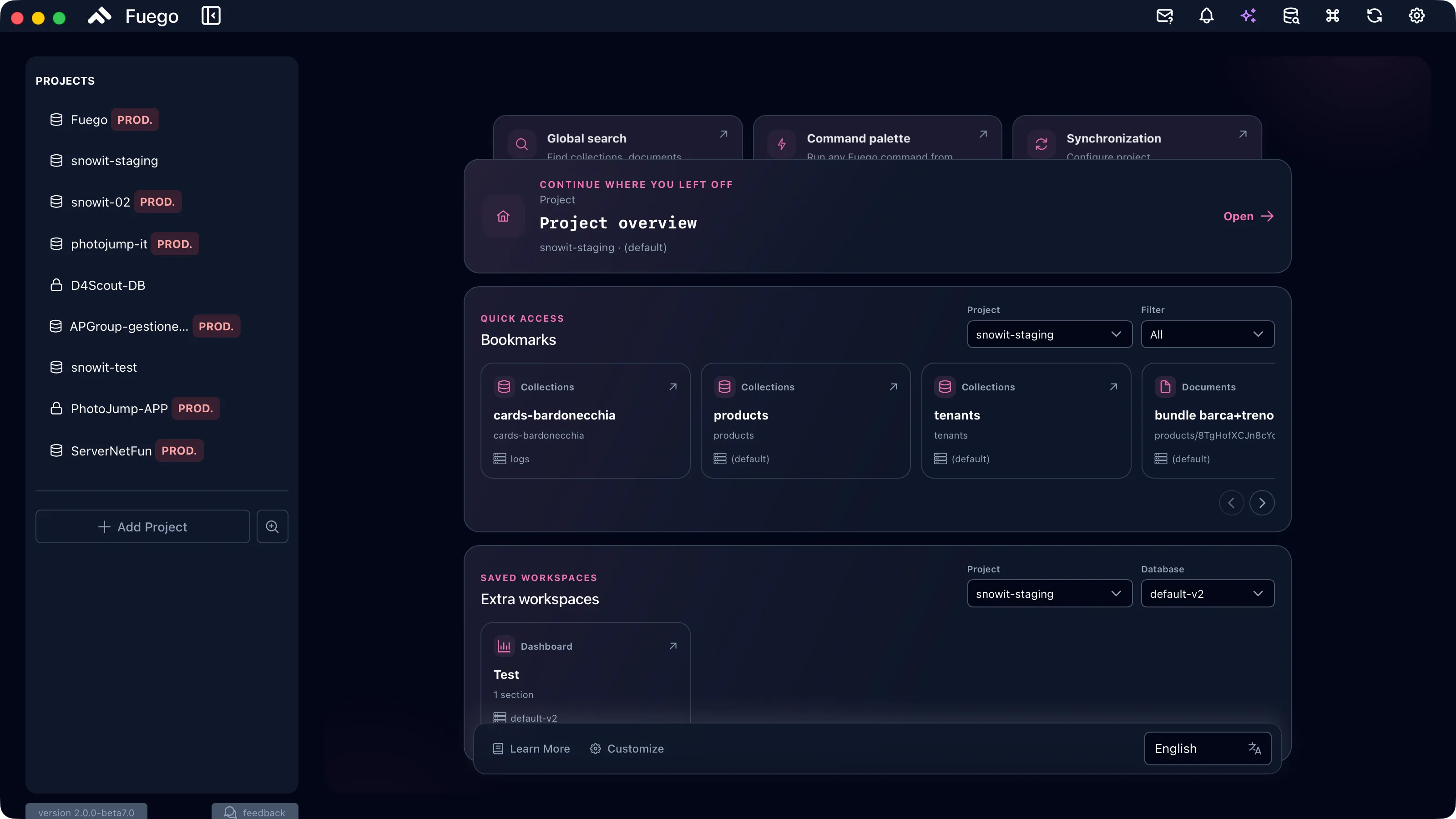
One naming change comes with it: what used to be called views is now called workspaces, everywhere in the app. Same thing, clearer name — your saved explorer and dashboard layouts are untouched.
Performance and polish
- Faster Firestore table view and user list, especially on large result sets
- Bulk update improvements — a clear summary before you commit, and errors grouped by cause instead of a wall of individual failures
- A sync button in the main toolbar for projects and settings
- A new macOS icon in Liquid Glass style
- Visual polish throughout, including the context menu and popover positioning glitches that showed up in 1.2 depending on available space
Fixes
- Fixed PITR appearing as not activatable when database info retrieval failed silently (details above)
- Fixed the “The request is not allowed by the user agent…” error when sharing
queries — sharing now writes a
.fuegofile through a native dialog instead of going through the Web Share API - Fixed editing Firestore objects (GeoPoint, Timestamp, Reference) in the inline popover editor
- Fixed update-data radio groups leaking state across modifications in bulk edits
Update now
Fuego 2.0 is available today. Download it from fuegoapp.dev or update from within the app. Existing 1.x licenses continue to work — there’s nothing to migrate.
If you hit something, or if the assistant does something surprising, tell us at support@fuegoapp.dev. The AI features in particular got much better because of beta feedback, and that loop is still open.
Useful resources: